USA:
USA:  India: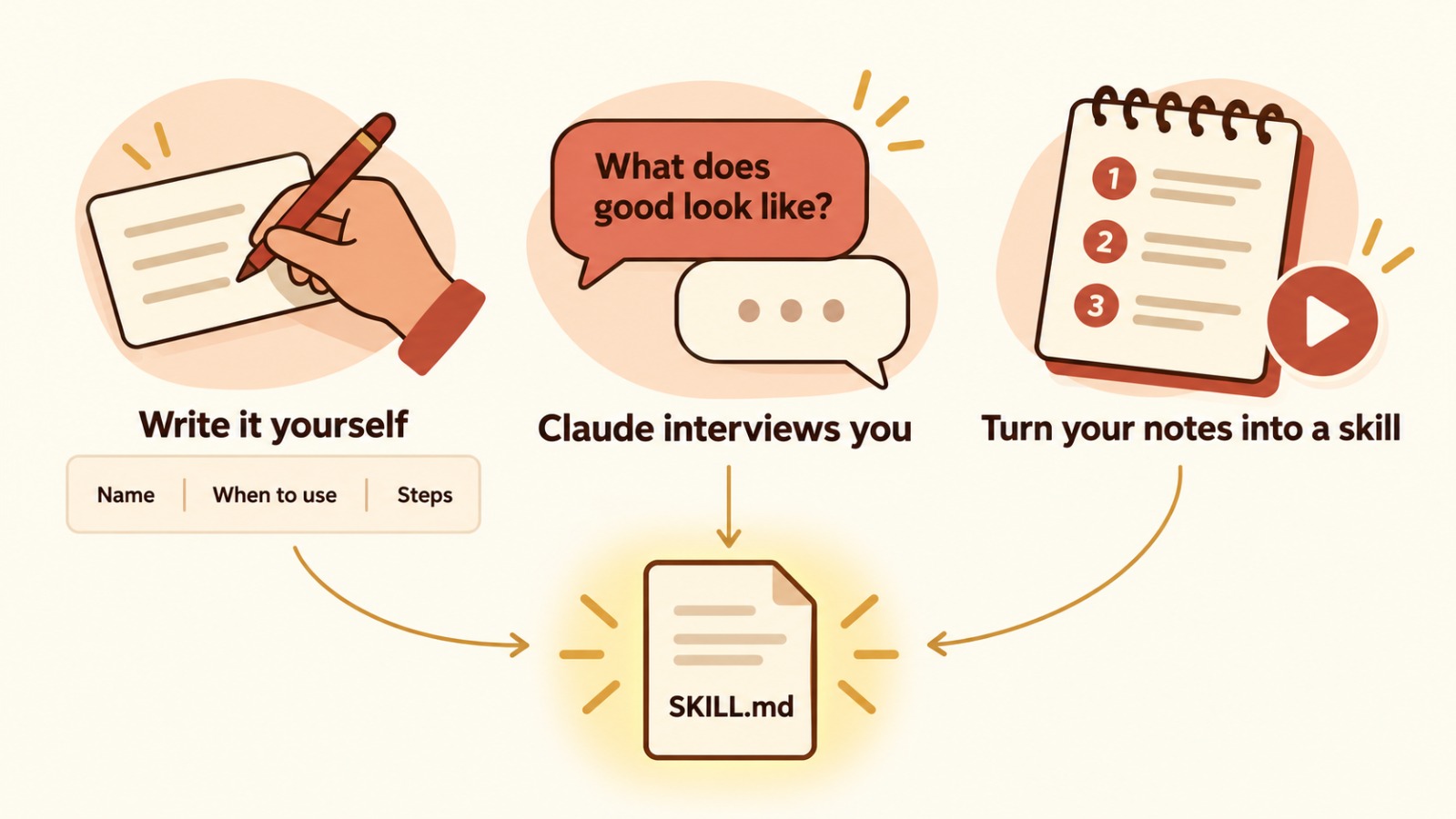
Instead of building a separate AI agent for every job, Anthropic recommends giving one agent many skills. A skill is a SKILL.md file with instructions for one task. Claude reads only each skill’s name and description and opens the right one when your request matches.
Key takeaways
One agent with many skills is simpler than many separate agents
Claude picks the right skill automatically, based on its description
You can write a skill yourself, let Claude interview you, or turn your workflow notes into one
Skills don’t sync across the Claude app, Claude Code and the API, and should come from trusted sources
Why skills instead of agents?
Think of a home kitchen. You don’t hire a different cook for every dish. You hire one good cook and give them a recipe book. In Anthropic’s talk “Don’t Build Agents, Build Skills Instead”, engineers Barry Zhang and Mahesh Murag make the same point: the agent stays general, and skills hold the expertise.
How Claude picks the right skill
According to Anthropic’s documentation, Claude keeps only each skill’s name and description in context at the start, at roughly 100 tokens per skill. When your request matches a description, Claude reads that SKILL.md, and only then loads the full instructions. Scripts and reference files are used only when needed. That’s why the description must say both what the skill does and when to use it.
Three ways to create a skill
1. Write it yourself. Create a SKILL.md file with a short name, a description of when to use it, the steps, the inputs, and what good output looks like. This works best when your process is already clear.
2. Let Claude interview you. Start a chat: “I want to create a skill for my weekly client status report.” Claude asks when you use it, what you start with and what good output looks like, then builds the skill. You can upload templates or examples too. In the Claude app, you then manage it under Settings → Capabilities → Skills.
3. Do it once and turn your notes into a skill. Do the task yourself and note every step, or record it and use the transcript. Upload the notes and ask Claude to turn them into a skill. This is a practical technique, not a separate Anthropic feature.
A practical example for an SME
A Kolkata software firm sends every client a status report each Friday. Instead of a new “report agent”, the team creates one skill: read the week’s task list, group work by module, flag delays, write in plain English, and show the draft for approval. Every project manager now asks Claude for “this week’s status report”, and the same skill runs each time. [CONFIRM: add ZTS Infotech’s own experience here, only if the team has actually done this.]
Two cautions
Skills don’t sync automatically. A skill added in the Claude app is not automatically available in Claude Code or the API.
Use trusted sources only. Anthropic warns that skills can run code, so review any skill before you install it.
Frequently asked questions
What is a SKILL.md file?
It’s a text file with a name, a description of when to use it, and step-by-step instructions for one task. Claude loads it when your request matches.
Do I need to call a skill manually?
Usually not. Claude matches your request to the skill’s description and uses it automatically, if the skill is enabled.
What is the easiest way to create a skill?
Ask Claude to interview you about your process. It asks questions and builds the SKILL.md for you.
Are third-party skills safe?
Only if they come from a trusted source. Skills can run code, so review them first.
-
Writen by Anirban Das