USA:
 India:
Install Ollama from ollama.com/download, then run ollama run qwen3.5:4b on an 8 GB laptop or ollama run qwen3.5:9b on 16 GB. The model downloads once, then runs on your own computer, and your prompts stay on your machine. Switch off Wi-Fi and ask again to confirm it’s local.
Key takeaways
Ollama is free and open source, and runs on Mac, Windows and Linux
8 GB of RAM handles small models. 16 GB is comfortable
The desktop app on Mac and Windows lets you drag in PDFs and text files
Models with names ending in “-cloud” run on Ollama’s servers, so use local models for private work
The example: one confidential contract
An accountant in Toronto has a client contract she can’t paste into a public chatbot. She wants the payment terms and the notice period. With Ollama, she can get both from a model running on her own laptop, and the file never leaves it.
Step 1: Check your RAM
Plan for the model’s download size plus 2–3 GB of free memory. 8 GB of RAM runs small models, 16 GB runs mid-size models comfortably, and 32 GB or more opens up larger ones. A GPU (Nvidia or Apple Silicon) makes answers faster but isn’t required.
Step 2: Install Ollama
Download the installer for Mac or Windows from ollama.com/download. On Linux, the official script is curl -fsSL https://ollama.com/install.sh | sh. Download it and read it first if this is a shared or work machine. Confirm the install with ollama -v.
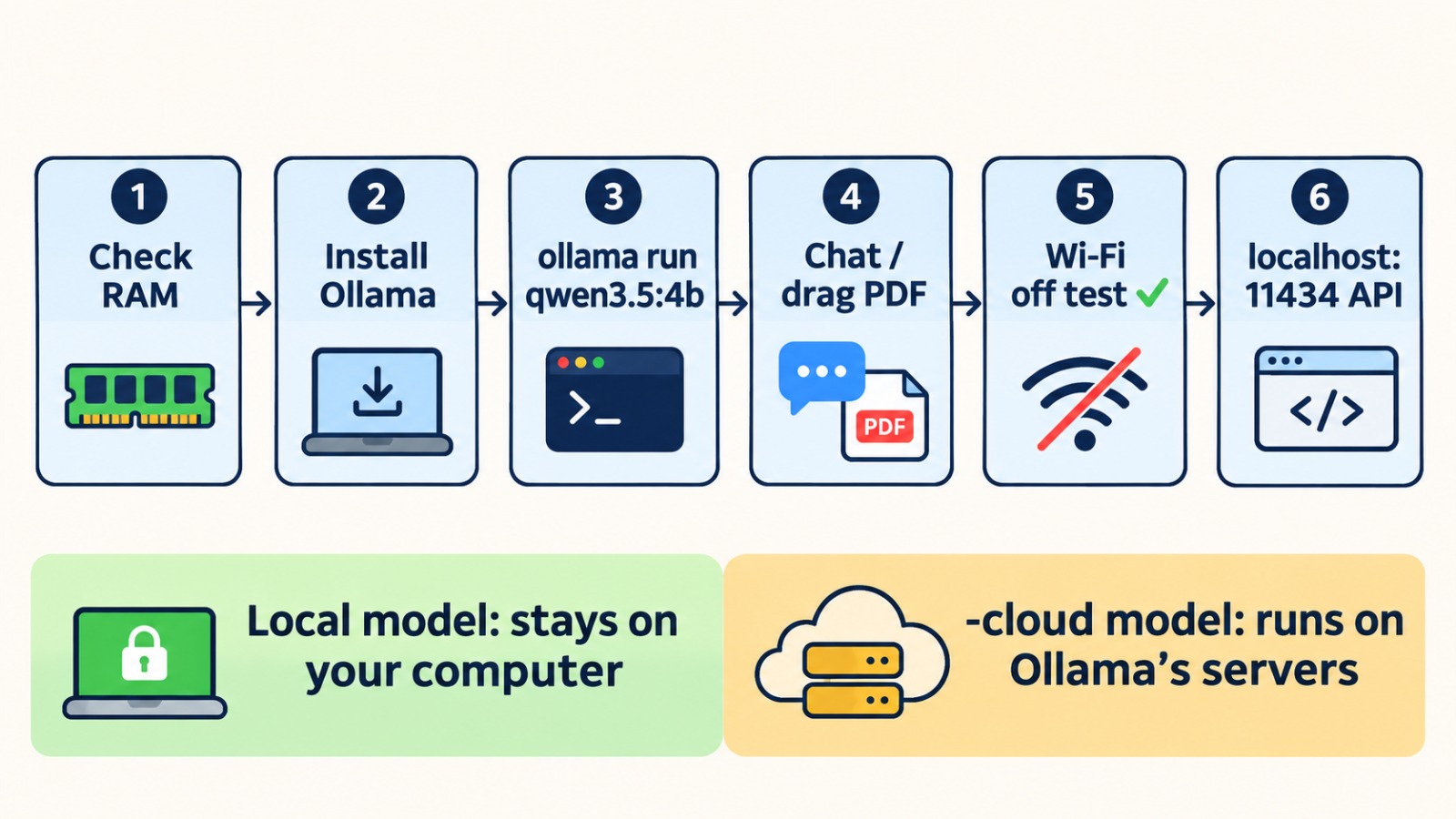
Step 3: Pick and run a model
8 GB of RAM: ollama run qwen3.5:4b
16 GB of RAM: ollama run qwen3.5:9b or ollama run gemma4:e4b
More memory: gemma4:26b or qwen3.5:27b
The first run downloads the model. After that, it starts from your disk.
Step 4: Chat, in the terminal or the app
Type questions straight into the terminal, or open the Ollama desktop app on Mac or Windows. Drag a PDF in and ask, “List the payment terms and the notice period.” For long documents, raise the context length in settings. This uses more memory.
Step 5: Run the airplane mode test
Switch off Wi-Fi and ask the same question again. If it answers, the model is running locally. Ollama also offers optional cloud models, with names ending in “-cloud”. These run on Ollama’s servers and need the internet, so avoid them for confidential files.
Step 6: Connect your apps (developers)
Ollama serves a local API at http://localhost:11434 that works with OpenAI-style clients. The API has no login of its own, so keep it on localhost. If you put it on a network, put proper access controls in front of it.
Where local AI falls short
A 4B or 9B model is good at summaries, drafts, extraction and simple Q&A. It won’t match the largest cloud models on hard reasoning or long, multi-step tasks. For many teams the practical answer is to handle private documents locally and send everything else to the cloud.
Frequently asked questions
Trending question: Is Ollama really free and private?
The software is free and open source. Local models keep your prompts on your computer once downloaded. Models ending in “-cloud” run on Ollama’s servers.
Trending question: How much RAM do I need to run Ollama?
8 GB runs small models like qwen3.5:4b. 16 GB is comfortable for 9B-size models. Allow the model’s size plus 2–3 GB spare.
Does Ollama work without internet?
Yes, after the model is downloaded. You need internet only to install, update and pull models.
Why is Ollama slow on my laptop?
Usually the model is too big for your memory, or it’s running on the CPU. Try a smaller model, or check that your GPU is being used.
-

Writen by Anirban Das