USA:
 India:
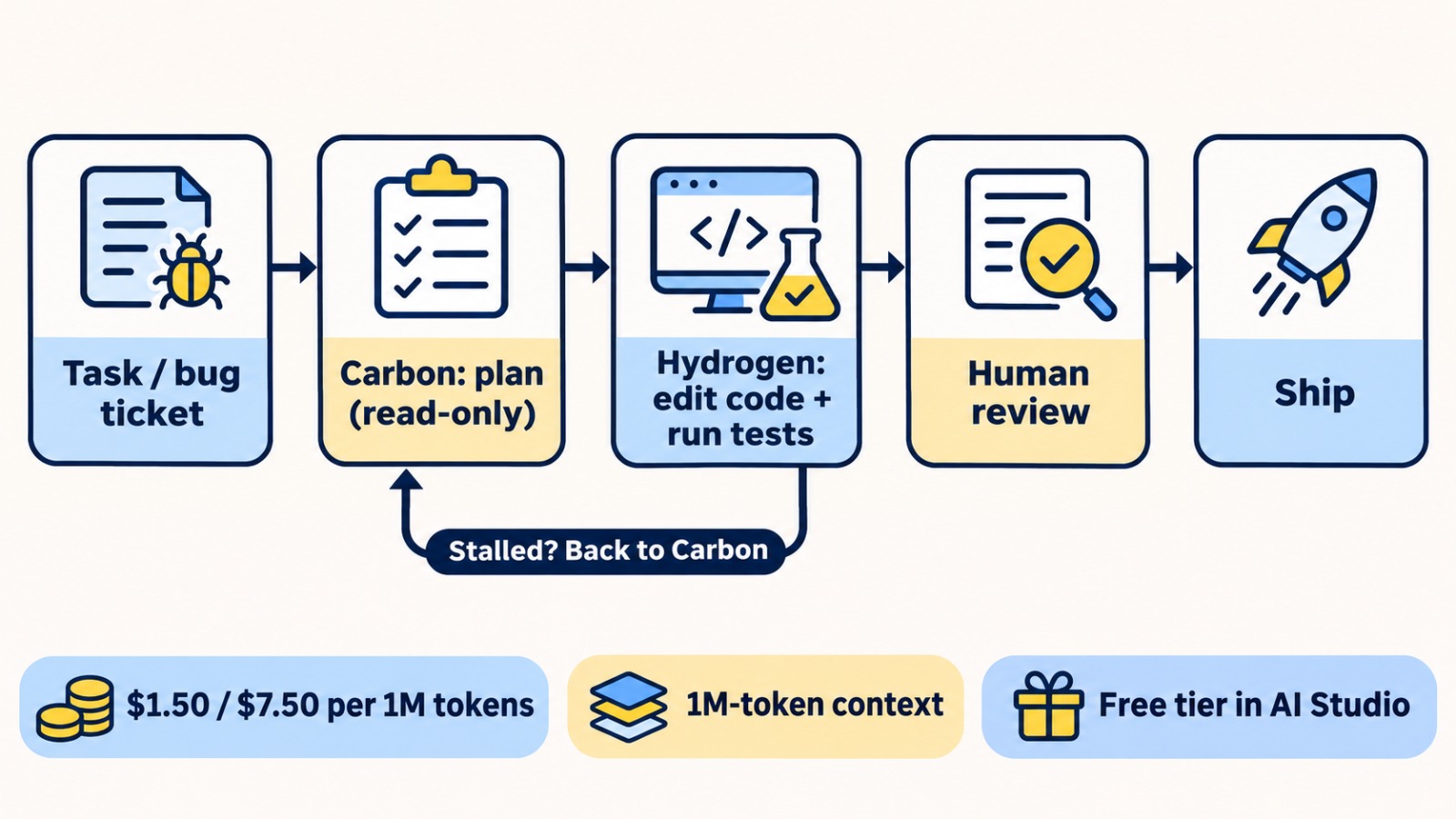
Gemini 4 Hydrogen is Google’s fast, low-cost model for coding and agent tasks, launched on 12 November 2026. It costs $1.50 per million input tokens and $7.50 per million output, has a 1M-token context, and pairs with Gemini 4 Carbon. Carbon plans, and Hydrogen does the work.
Key takeaways
Built for fast execution: code fixes, tests, research and multi-step agent tasks
Google reports 2.5x faster task completion than Gemini 3.8 Flash (not yet independently verified)
In Google Antigravity’s Orchestrator, Carbon plans and Hydrogen edits and runs tests
Try it free, with rate limits, in Google AI Studio
One working day with Hydrogen
A small online store in Toronto gets a bug ticket at 9 a.m.: the checkout button breaks on mobile. The developer hands it to Hydrogen. It reads the codebase in one pass, since its context window holds about 1M tokens, finds the broken file and makes a small fix. By 9:15 the tests pass. At 11 a.m. the same model turns a sales spreadsheet and a PDF report into a short summary with sources.
Hydrogen vs Carbon: architect and builder
Google positions Carbon and Argon as its deep-reasoning frontier models, and Hydrogen as the model that executes. Think of Carbon as the architect and Hydrogen as the builder. In Antigravity’s new Orchestrator, Carbon plans in a read-only phase and Hydrogen edits code, updates packages and runs tests. If Hydrogen stalls, control goes back to Carbon. Google reports near-Carbon task success with about 24% less quota used. The Orchestrator rolls out to AI Ultra first.
What it costs
Pricing is flat across the full context: $1.50 per million input tokens and $7.50 per million output. Cached input is $0.075 per million. As an illustration, a job that reads 200,000 tokens and writes 20,000 costs about $0.30 + $0.15 = $0.45.
The numbers, and how to read them
Google reports 57% on Terminal-Bench 4.1, against 18.2% for Gemini 3.8 Flash. It also reports a score of 51 on the Artificial Analysis Intelligence Index at the default “high” level and 54 at “xhigh”, and more than five times fewer fabricated claims than 3.8 Flash. These are Google’s figures. Run Hydrogen on a few real tickets from your own backlog before you rely on them.
How to start this week
Open Google AI Studio and select Gemini 4 Hydrogen. The free tier is rate-limited.
Use the “high” thinking level for most tasks. Google says “xhigh” can overthink simple prompts.
Start with low-risk work: test writing, small bug fixes, codebase Q&A and report drafts.
Keep human review and CI test gates on every change. Google lists hallucinations and timeouts as known limits.
Who should use it: teams with a steady flow of routine coding, research or reporting tasks where speed and cost matter. Who should wait: teams whose work is mostly long, high-stakes reasoning, where Carbon is the better fit.
Need help putting AI agents into your development workflow?
Frequently asked questions
Trending question: What is Gemini 4 Hydrogen, and how is it different from Gemini 4 Carbon?
Hydrogen is Google’s fast, cheaper model for executing coding and agent tasks. Carbon is the deeper reasoning model. They can work together, with Carbon planning and Hydrogen doing the work.
Trending question: Is Gemini 4 Hydrogen free to use?
Partly. The Gemini API has a rate-limited free tier, and free Gemini app users get Hydrogen through automatic model selection. Paid API use costs $1.50 per million input tokens and $7.50 per million output.
Where can I use Gemini 4 Hydrogen?
In the Gemini API, Google AI Studio, Android Studio, the Gemini app, Google Search, Gemini in Sheets and Google Antigravity for AI Pro and Ultra subscribers.
Is Gemini 4 Hydrogen good for coding?
Google built it for coding and agent work and reports strong benchmark gains over Gemini 3.8 Flash. Test it on your own codebase, and keep code review in place.
-

Writen by Anirban Das